






Project Recording

Keep track of times and costs

Our modules

Industries in which it can be used

production

Krutec WEB Time Tracking is particularly well-suited for recording project times in production. Together with Krutec WEB Project Tracking, you can record time for projects and activities and keep track of costs with the associated reports.

Construction sites

Use our smartphone app's crew scheduling to schedule your team in and out of construction sites. Mobile time tracking also lets you track times and projects from anywhere.

Home office

Let your employees track time and projects from home or on the go. Track activities and keep track of the work your employees have completed.

logistics

Record your logistics employees' travel times and breaks, whether via a mobile app or a separate time recording terminal for the vehicle.

And many more

With more than 4,500 customers, we offer digital time tracking software for projects in every industry. Contact us and let us find the optimal solution for your needs.

Some project recording functions at a glance

Hierarchy

Starting with projects and activities that you record when tracking time in our project software, you can further expand this hierarchy. Create main projects and assign them to projects, or create subprojects and assign them to projects. This could look like this:

Main project --> Project --> Subproject --> Activity

On the project terminal, you then select the project and activity, depending on your settings. You can also specify whether your employees' breaks should interrupt their booked projects or not.

Parallel

In addition to standard project entry, which automatically completes the previous project or activity, you also have the option of working with parallel entries. This allows you to run multiple projects and activities simultaneously, which is especially useful for machine entry.

Quantity

Use the unit count entry to keep track of your project's volume. Combined with milestones and the unit count monitor, this allows you to maintain a constant overview of your ongoing projects – in real time. You can record unit counts either at the project terminal or the web terminal. Whether you do this at the end of the activity, in between, or at the end of the day is entirely up to you.

Summen

Ähnlich den Stückzahlen können Sie auch nur Summen auf Projekte und Tätigkeiten verteilen. Auch das ist über das Projektterminal und das Webterminal möglich. Ganz egal, ob während des laufenden Projekts oder im Nachhinein: Die Eingabe der Projektsumme ist zu jedem Zeitpunkt möglich. Eine zusätzliche Einstellung ermöglicht es zudem, dass nur so viel Projektsumme verbucht werden kann, wie ein Mitarbeiter auch gearbeitet hat. Diese Einstellung lässt sich an- und wieder abschalten.

Material and articles

Manage items and materials using Krutec WEB Project Management. Assign items to projects and keep track of material costs. Each item can be assigned an EAN code, storage location, storage bin, item number, unit and dimensions, and purchase and sales prices. A custom item tree with subcategories simplifies item management.

Web-based

Our time tracking solution is 100% web-based. When you use our software for projects, you can easily do so via your existing web browser, such as Google Chrome, Microsoft Edge, Apple Safari, and many others. This allows you to track time for projects without installing any software on your workstations. At the same time, it allows you to access the software from anywhere with internet access. This makes our time tracking solution for projects an ideal solution, especially for home offices.

On-Premises / SaaS

You decide whether you want our software installed locally on your server, hosted by us, or completely in our cloud. Whichever you choose, you'll always receive the same software for project management.

30 years of experience

With over 30 years of experience, we are familiar with all the regulations associated with projects and time tracking. Thanks to the customizable configuration options, we have always been able to accommodate all of our customers' regulations and individual needs.

Project monitor

Keep track of your projects. The project monitor shows you how far your projects have progressed. You can compare the planned and actual progress. The difference and the factor in % are also displayed. If you also use our milestone function, the corresponding milestone is also displayed with a traffic light. In the project monitor, you can select projects by approved, completed, and those booked today. Together with the date selection, you only have an overview of the projects you want to see.

Quantity monitor

Similar to the Project Monitor, the Quantity Monitor also allows you to display the manufactured and planned quantities per project. Using a post-calculation, you can directly see how the manufactured quantities affect the overall project.

Customers and suppliers

You can assign a customer to each project. You can enter all master data for the customer and also note contact details. You can then book directly to the customer in the smartphone app and see the projects assigned to that customer. In the project reports, you can then specifically evaluate a customer's projects and easily forward the hours worked, if necessary.

Preliminary and final calculation

A constant comparison between preliminary and final calculations shows you your costs directly on screen, including material, labor, and incidental costs.

Import and export interface

Import projects and activities, as well as the target times for those activities, directly from an existing system. Export projects, activities, and the hours spent on them in the same way for further processing in an existing system. We are happy to expand our interfaces to meet your requirements.

Evaluations and lists

In the Krutec WEB project recording, more than 10 lists and evaluations are available to you: starting with project evaluations whose sorting and filtering you can set, through total evaluations, a target-actual comparison and productive times of your employees, up to barcode lists that allow you to scan projects and activities at the project terminal with a barcode hand scanner.

Multi-tenant capable

Krutec WEB Project Management allows you to strictly separate your companies using clients. Each client has its own access and data. Data from other clients is never visible. However, if you don't want to separate your projects by client, you can assign your employees to locations, departments, and even individual groups yourself during project personnel planning.

Promise for the future

With constant updates that bring new features, improvements, bug fixes, requests, and, of course, legal changes, you're always future-proof with your projects and our time tracking. Our in-house development allows us to respond to changes at any time and implement them in our software.

Electronic project recording and why it makes sense

With electronic project recording, you can save time and money in the short term, as you no longer need to enter handwritten project notes into a program or laboriously distribute the hours among individual activities.

Plan your projects, have your employees book them, and then evaluate them. Project tracking will quickly pay for itself, allowing you to invest the time saved where it’s really needed.

We would be happy to discuss your requirements with you and advise you personally.

Additional modules besides project recording

The modular structure of our software allows you to integrate additional modules at any time. Our time tracking feature is essential for Krutec WEB project tracking .

Time recording

As the main program, time recording offers you the possibility to create and manage personnel in addition to recording times and all bookings.

Personnel planning

With Krutec WEB Personnel Planning, you can schedule your employees quickly and easily. Assign tasks or projects and define shifts.

Access control

With Krutec WEB access control, you can now manage your rooms, doors, gates, barriers, turnstiles, tripod barriers, and much more. Krutec WEB access control accesses the same database as time recording. This means you don't need to create your employees and their data again.

Easily record times and projects: here's how

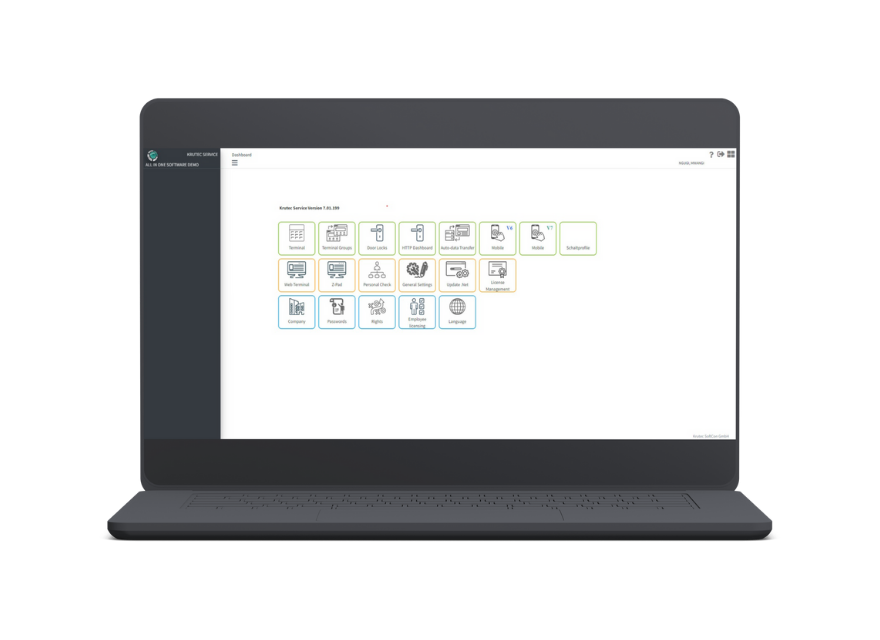
Webterminal

from any PC or notebook

Log in from anywhere you have internet and record your work and project times
MORE
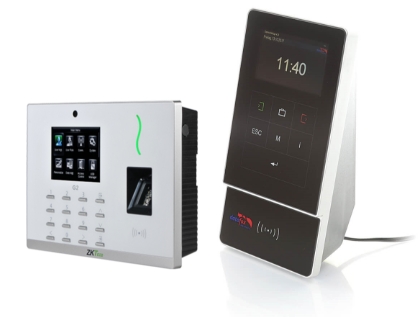
Terminals

For your location

The classic method for time and project tracking. Permanently mounted and always ready for use, optionally with a handheld barcode scanner.
MORE
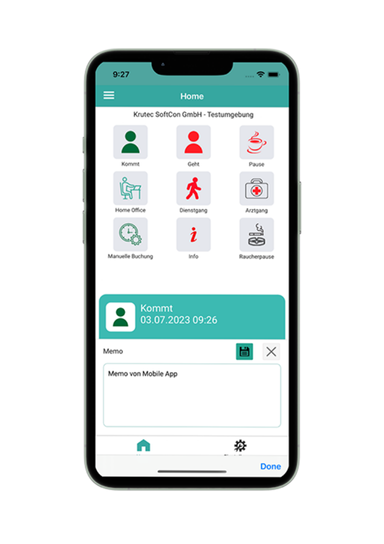
Smartphone

available for iOS & Android

The mobile solution for time and project tracking. Recording possible from anywhere.
MORE

Preise

Profi WEB Projekt

Für mittlere bis große Unternehmen

ab 900 netto

Anfragen
  • On-Premises (Lokale Installation)
  • Mandantenfähig
  • Tiefere Hierarchie
  • 10+ Listen & Berichte
  • Import / Export Schnittstelle
  • 2 Monate kostenloser Support
  • weitere Module optional
  • und vieles mehr...

Easy WEB Projekt

Für kleine Unternehmen

ab 630 netto

kaufen
  • Projekte und Tätigkeiten
  • Webterminal
  • alternativ Projektterminal
  • 1 Monat kostenloser Support

Cloud Projekt

Der schnellste & einfachste Weg

ab 6 / Monat

Anfragen
  • Software-as-a-Service (SaaS)
  • Profi WEB Projekt
  • Profi WEB Zeiterfassung
  • Webterminal inklusive
  • kein eigener Server notwendig
  • Updates & Backups
  • Telefon & E-Mail Support
  • Schnell einsatzbereit
  • Kurze Einführungsphase
Do you have any questions?
We would be happy to inform and advise you personally.

Schedule an appointment with us, and we’ll be happy to present our software to you online or at your location. Get a firsthand look.