
Self-Service
The employee portal
Submit requests for absences
Forgotten your booking? Simply request a correction.
Display of overtime, remaining vacation time and much more.
Real-time recording of working hours
Live view of present and absent people
Always everything at a glance in the calendar
Your benefits
Increase productivity
Increase your employees' productivity! With Krutec Self-Service, managing vacation requests and overtime is a secondary concern, allowing your employees to focus on their work. Less administrative work and higher productivity.
Simple corrections
Mistakes happen. With Krutec Self-Service, your employees can quickly and easily enter forgotten working hours. Lighten the load on your HR department and ensure fair working hours.
Absences
Let your employees request absences quickly and easily. Save valuable time approving and rejecting requests. Digitally document them paperlessly and in compliance with legal requirements. No more verbal agreements that no one remembers.
Live view
Keep track of your employees in a live view. See who's present, absent, or even who hasn't shown up yet. Data protection compliant and always up-to-date.
Suitable for everyone
Suitable for everyone The Krutec Self-Service is suitable for all employees, regular workers as well as supervisors and department heads, who also receive an overview of their department.

Forgotten a booking? Simply request a correction via self-service. Subsequent bookings of project times and totals, as well as cost centers.
Submit requests for absences, such as vacation, special leave, business trips, reducing overtime, seminars, training.
Keep track of your own overtime, remaining vacation days, and old vacation days at any time without having to constantly ask.
Real-time recording of all types of working hours. Clock-in and clock-out bookings, breaks, business trips, project and cost center bookings. From anywhere, even on the go
See in real time who’s present, absent, and who hasn’t shown up yet. Anytime, from any browser.
Your own staff calendar shows all your absences, including planned ones. A department calendar helps you keep track of your department.
Self-Service
Functions
Self-service gives your staff a quick overview of their working hours, allowing them to submit vacation requests, fill out overtime requests, and view their own monthly reports. The paperless request process with its individual approval structure saves you and your employees a lot of time when managing your vacation and overtime requests.
And all this from anywhere, if desired. Your staff can view their hours worked, submit vacation requests, or even record timesheets from home—an ideal feature for home offices.

Highlight Feature
Submit applications
With self-service, your employees have the opportunity to submit vacation requests, for example, digitally from anywhere. Each request is subject to a freely definable approval process.
Submitting absence requests is the main function of Self-Service. It allows for quick and easy submission of a request for vacation, for example.
In principle, a request can be submitted for any absence recorded in time recording. The most common absences that can be requested include:
- Vacation and half day vacation
- Special leave
- business trip
- Seminar and training
- Reduce overtime
Correcting forgotten or incorrect bookings can also be done by submitting a request via the self-service system.
Your employee will first receive a self-service notification indicating the error. The approver structure for corrections may differ from that for absences.
In addition to the normal arrival, departure and break bookings, project and cost center bookings can also be corrected.
The correction can optionally consist of the times or just the total amount worked on a project or even the number of pieces in connection with our project recording.

Highlight Feature
Permit
Every request requires approval. One or more decision-makers are defined in a fixed structure, so it’s possible that not just one person, but up to six people, must approve a request before the approved request is automatically entered into the time tracking system.
During the approval process, we distinguish between three types of people.
The majority of your employees are “requesters.” A requester only has access to their personal information and, if applicable, the department calendar.
The applicant’s task is to submit applications for vacation, for example, digitally and thus paperlessly and to correct his incorrect bookings if, for example, the “going-out booking” was forgotten the day before.
A recommender is optional, but offers the possibility to issue a recommendation about an application, which in turn is seen by the decision-maker.
For example, the recommender can use a positive recommendation to make it clear that he or she is representing his or her colleague during his or her absence.
A recommendation has no impact on the approval process and can be overruled by a decision-maker. However, the recommendation is recorded.
Typically, one or more supervisors, someone from human resources, or the management team make the decision on a request. If a request is approved, it is automatically entered into the time tracking system and documented paperlessly.
It's that easy!
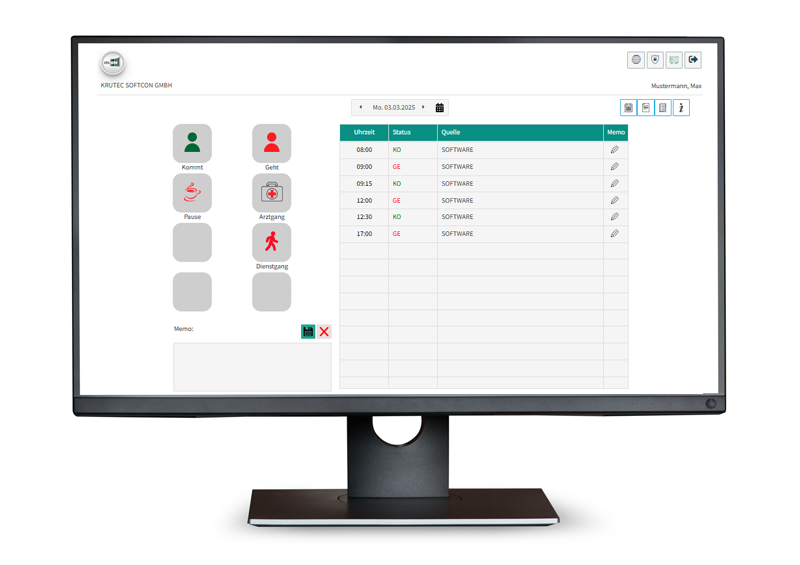
Bookings via the web browser
Web terminal
You can also use the web terminal to record all time, project, and cost center bookings in real time and from anywhere. This makes the web terminal perfect for home offices.
- No installation necessary
- Available with any web browser
- freely configurable
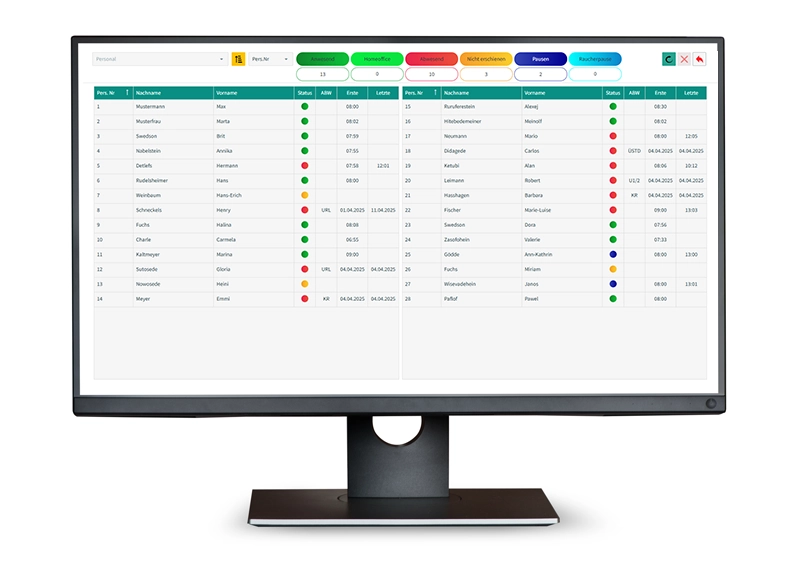
Live-View
Personnel check
A live view of your employees’ status. Keep track of who is currently present, absent, or not yet reported to work.
- No installation necessary
- Available with any web browser
- Real time
Hosted on-premise on your
server or in our cloud.
You decide, the software is the same.
Do you have any questions?
Please feel free to contact us.
We are available by phone and email. We would be happy to schedule an appointment for an online demonstration and answer any questions you may have.